Table of Contents

Are you frustrated by missing information in your songs? Are you unable to play back your favourite tracks? Maybe you are a recording artist and need to improve the information in your distributed songs? Whether you need to regain control of your music collection or simply make some refinements Jaikoz offers an effective music management solution. The missing information in your files is known as Metadata and is stored in a Tag. The Jaikoz Tagger is a powerful yet simple to use tool that allows you to organize, edit and correct thousands of these tags with ease.
Jaikoz has powerful automation features designed to do the hard work for you. Jaikoz uses MusicBrainz, an online database of over ten million songs. MusicBrainz is a community based database with contributions by over 200,000 people and its system of moderation ensures the data is extremely accurate. Many of these songs also have associated Acoustids provided by Acoustid, allowing a song to be identified by the actual music, so it can do a match even if you have no metadata! This feature means that Jaikoz gives you the flexibility to lookup your songs by both the acoustic id and the Metadata making Jaikoz a very accurate tool. Jaikoz also uses other databases such as Discogs and Amazon to provide even better matching.
No identification system is 100% accurate so we have made it as quick and easy as possible to edit your data manually as well. Jaikoz uses a convenient spreadsheet view to allow you to edit information very quickly and provides many auto-formatting tasks. For example it compares your files to each other and using this information it can correct missing information and spelling mistakes. Jaikoz can export/import your metadata to/from a spreadsheet, and can rename filenames and folders from your metadata in your chosen format.
Jaikoz provides access to many more fields than just the popular ones like artist and album, in fact you can modify ninety fields such Official Artist Web Page or ISRC code and Play Counter. Jaikoz also provides a split screen view letting you view the original file(s) and the changes you have made at the same time. Jaikoz transparently supports tagging of Mp4, M4a, M4p, Flac, Ogg Vorbis files and Mp3 files with ID3v1,ID3v2,ID3v2.2,ID3v2.3 and ID3v2.4 tags, and allows easy conversion between them.
Jaikoz is a tag editor not a music player and it has been designed to be fully compatible with popular media players. If you are an iTunes user you can configure Jaikoz to update your iTunes library from within Jaikoz. Not all media players interpret metadata in the same way so there are options to enable maximum compatibility with Windows Media Player and Media Monkey as well.
Jaikoz is available with the same features for Mac OS X, Windows and Linux.
-
Acoustic matching using MusicBrainz and Acoustid to match tracks based on the actual music.
-
MetaData matching using MusicBrainz to match tracks from the metadata in your songs.
-
MetaData matching using Discogs to match tracks from the metadata in your songs.
-
Automatically download front cover album art from the Internet into your songs.
-
Automatically extract embedded artwork into cover.jpg files.
-
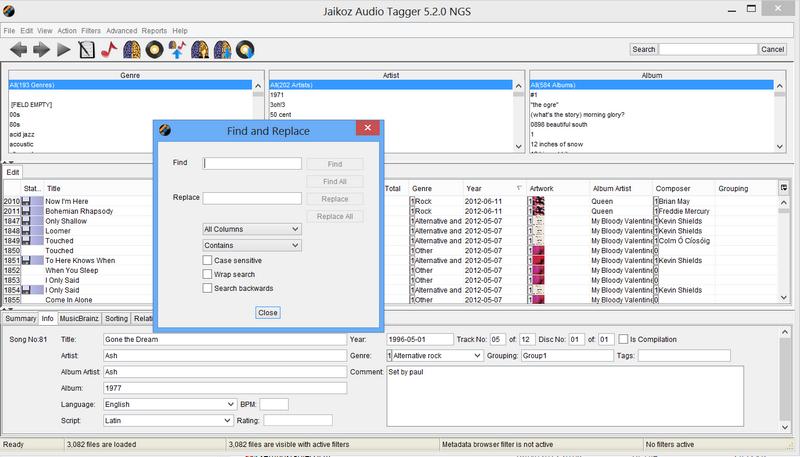
Powerful Find and Replace to quickly edit your data.
-
Identifies duplicate files based on the Acoustic Id or the MusicBrainz Id.
-
Rename your files and folders based on your tag Metadata.
-
Intelligent File Name to Tagger can extract information from the filename into the tag without having to know the format of the field.
-
Intelligent Auto Match compares different Songs and finds field matches and then allows all similar fields to be formatted the same.
-
Intelligent Auto Format provides automatic capitalization, conversion of special words and removal of invalid and punctuation characters.
-
Designed to allow tagging of large number of songs.
-
The innovative spreadsheet view allows easy editing of all fields.
-
Provides full support of all text fields and partial support of all other fields.
-
Automatically keeps v1 and v2 tags synchronised.
-
Split screen view allows you to view the data before and after modifications at same time,view are automatically synchronised with each other.
-
Full Unicode support allow any character from any language to be used.
-
Easy conversion of tags between version.
-
Displays what is actually contained in the tag allowing the user full control.